The pain
Scattered context, unclear ownership and important conversations separated from the work.

VENTURE COMMAND CENTER / VCC
A shared place to understand the work, connect the team and turn decisions into accountable action.
Venture Command Center (VCC) is Launchistry’s workspace for founders, Venture Captains and contributors. It connects venture context, VLM workstreams, tasks, conversations and AI assistance so the reason for the work stays close to the people doing it.
By Launchistry · Product guide · Updated October 26, 2026
THE PAIN / TOO MUCH CONTEXT LIVES BETWEEN THE TOOLS
A founder sees a launch date. A Captain sees a list of unfinished work. A specialist sees a message asking for help. The background is in another document, the decision is in a conversation and the person who knows the answer is busy.
The cost is more than time spent searching. A proposal can be mistaken for a commitment. An unconfirmed estimate can look like a deadline. A task can move forward while the decision it depends on remains unresolved.
Scattered context, unclear ownership and important conversations separated from the work.
Repeated questions, missed handoffs and activity that is difficult to connect to the venture’s priorities.
Bring the relevant context, people, task details and decisions into a shared working view, with review before commitment.
INSIDE THE WORKSPACE / START WITH WHAT NEEDS ATTENTION
The founder overview brings unfinished work, proposals awaiting review and missing timing into focus. Summary counts lead into the supporting records, helping a leader inspect the work behind a number.
The Notifications & Alerts panel groups chats, approvals, tasks, meetings, email and password notices according to available sources and access. Priority indicators help distinguish items that need immediate attention. Review opens the relevant work or source. Reminders, forgotten items and recoverable alert Trash help manage the attention queue without deleting the underlying records.
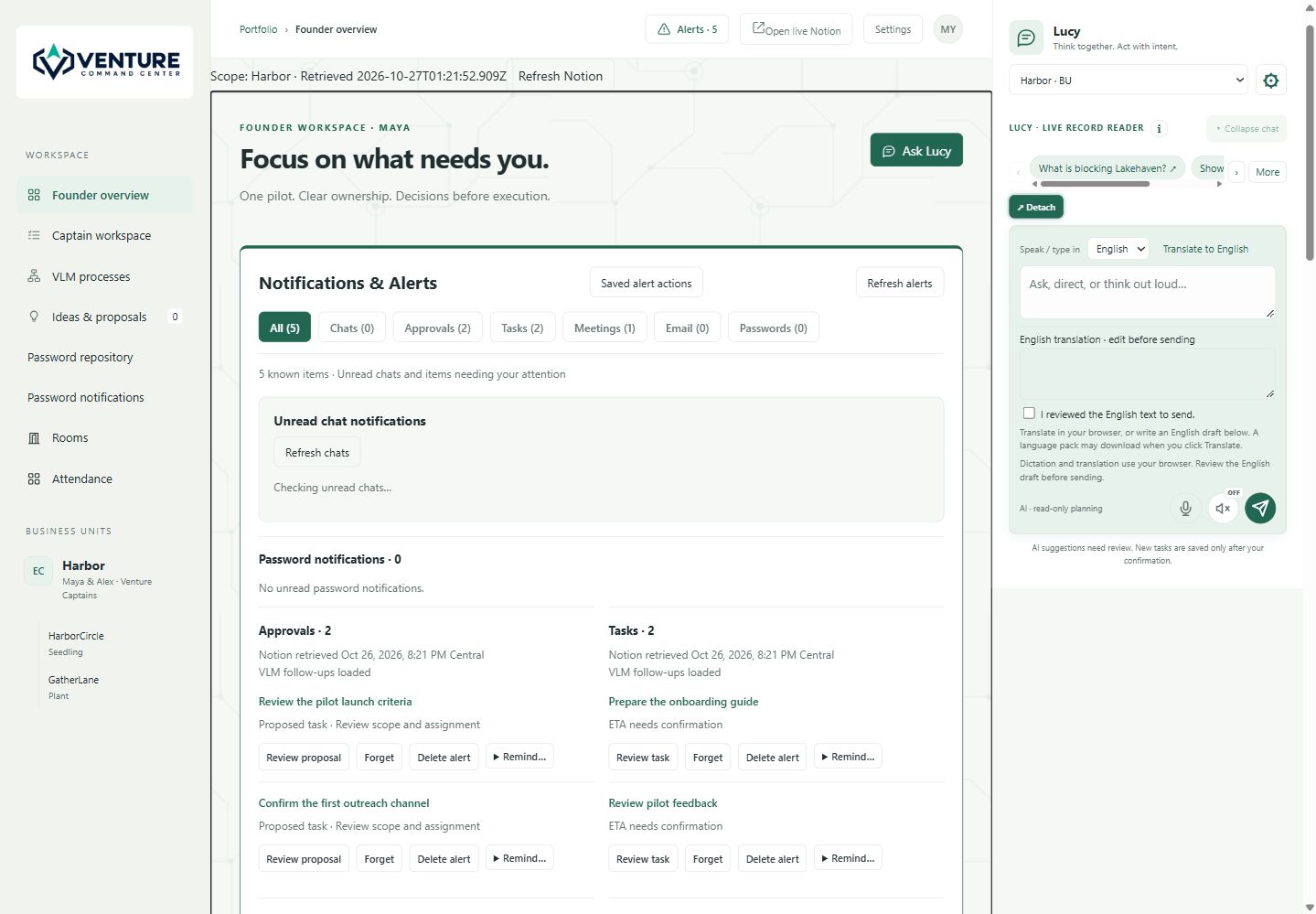
“Proposed” means the work still needs review. “Missing ETA” identifies unknown timing; it does not automatically mean overdue. Source timestamps and availability cues help the team understand the limits of what is on screen.
CAPTAIN WORKSPACE / MAKE DELIVERY EXPLICIT
The Captain workspace brings the execution questions together: What is the task? Which venture and VLM process does it support? Who will do it? What timing is confirmed? What evidence or decision is still needed?
Filters surface proposed work, missing executors and missing estimates. Search helps a contributor find a task, process or person. Opening task details brings the source context, responsibility, next action and evidence into the discussion. Review turns a broad intention into a commitment the team can assess.
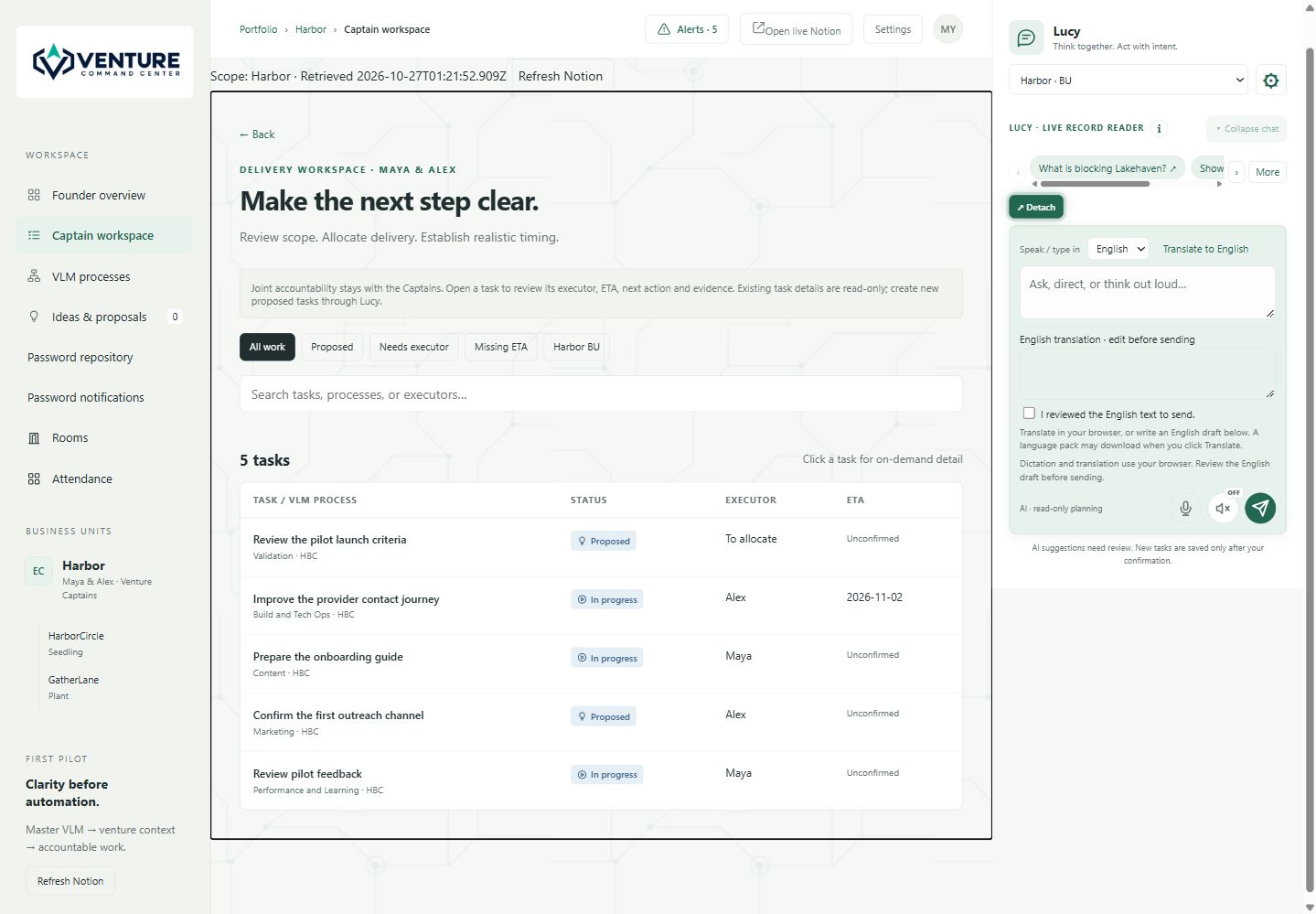
A Captain can coordinate several contributors while remaining accountable for the venture’s progress. Showing an executor and an estimate makes the delivery plan concrete; recording a blocker makes an unresolved dependency visible.
VLM + VCC / METHOD MEETS EVERYDAY WORK
The Venture Launch Model’s 17 workstreams describe how a business is validated, built, piloted and grown. VCC connects work with that framework, helping the team see whether a task serves Validation, Content, QA, Marketing, Customer Success or another part of the model.
The VLM management area supports process definitions, reusable subtasks, version history and venture-specific adaptations. Reviewed inheritance helps a venture consider changes to the shared model while preserving local exceptions. Configured slide bindings support reviewed text synchronization; a source change should be inspected before it becomes a venture change.
A useful question changes from “Did we finish more tasks?” to “Did this work address the uncertainty holding the venture back?”
LUCY / A THINKING PARTNER WITH CONTEXT
Lucy sits alongside the work. Ask about available records, explore a blocker, compare possible next steps or turn a rough idea into a proposed action. Venture and business-unit scope help keep the conversation relevant to the work being discussed.
The configured AI provider and available sources determine what Lucy can use. Source links and task context help the team inspect the basis for an answer. A suggestion still needs judgment: review the facts, the proposed scope and the people involved before committing to an action.
Voice dictation, reading answers aloud and configured language controls offer additional ways to work with the conversation. Availability depends on the browser, device and workspace configuration. The composer can be moved or detached, and history can be collapsed to keep the current work in view.
Lucy can help prepare the next step. The responsible person reviews it. Saving a proposed task does not silently approve its budget, deadline or any external communication.
CONNECTED WORK / PEOPLE, CONVERSATIONS AND SOURCES
Rooms support team conversations, while unread-chat notices help users return to discussions that need attention. Membership, room lifecycle and retention settings shape who participates and how long the conversation remains available.
Team views, availability status and attendance controls help people understand who is present, busy, away or on a break. They provide useful coordination context alongside the work.
Authorized private panels bring upcoming meetings and saved email reviews into the dashboard. Follow-up tasks keep an action separate from its source email. Timestamps help users decide when to refresh or inspect the original source.
Workspace membership, business-unit scope and connected-source access determine what is available. Private calendar, email and credential information receives additional controls. Credential sharing has its own permission and history workflow.
Features and connected sources depend on the configured workspace. The public screenshots contain fictional information; entering the command center requires authorized access.
A FICTIONAL DAY WITH VCC / HARBORCIRCLE
Maya is preparing HarborCircle, a fictional local-services directory, for a wider pilot. Alex coordinates delivery. A provider contact flow is being improved, an onboarding guide is unfinished and the first outreach channel still needs a decision.
Maya opens the founder view and sees proposals awaiting review. She opens the supporting work rather than treating the count as a sign of progress.
Alex uses the Captain view to inspect the proposed outreach task. The team agrees what it should accomplish, who will do it and what timing is realistic.
They ask Lucy to help frame the questions for the pilot review. They check the available records and discuss the recommendation with the people responsible.
After the pilot, the team reviews contact requests and customer feedback. An onboarding problem becomes a proposed improvement linked to the right VLM workstream. The roadmap changes because the evidence changed.
HarborCircle, Maya and Alex are fictional. This story illustrates a workflow and does not report customer results or promise a commercial outcome.
GETTING STARTED / ONE VENTURE IS ENOUGH
Start with the full Venture Launch Model, or talk to Launchistry about your workspace.
COMMON QUESTIONS
Venture Command Center (VCC) is Launchistry’s workspace for connecting venture context, accountable execution, team conversations and AI assistance. Founders and Venture Captains use it to review priorities, ownership, proposals and next actions.
VCC is designed for founders, Venture Captains and authorized contributors who coordinate work across a venture or portfolio. Different views help leaders review decisions and contributors understand the work they are responsible for.
The Venture Launch Model (VLM) is the methodology: 17 connected workstreams for launching or relaunching businesses. VCC is the workspace that helps a team connect that methodology with context, conversations and execution.
Lucy helps users ask questions about available venture records, explore blockers, brainstorm and prepare proposed next steps. Source access and configured connections determine what she can read. AI answers and proposed actions need human review.
No. Suggestions and proposals are distinct from accepted work. Review the scope, assignment and timing before saving or accepting a proposed action. A proposal does not itself approve spending, deadlines or external communication.
The panels show connected information according to the configured workflow. Saved calendar syncs and email reviews include timestamps; a saved snapshot is not a fresh calendar or mailbox read. Review the source and refresh when a current decision depends on it.
Access depends on the person’s authorized workspace, business-unit permissions and connected sources. Private calendar, email and credential information has additional access controls. A shared dashboard does not grant every member access to every source.
Contact Launchistry to discuss your venture, the people involved and the sources you want to connect. Existing authorized members can use the command-center sign-in link. Available features depend on the configured workspace.
YOUR NEXT CLEAR MOVE